Why a random orbit sander leaves swirl marks, and how to stop them
Swirl marks from a random orbit sander usually come from skipping grits, pressing too hard or moving the sander too fast. The fix is to step up through the grits so each one removes the last one's scratches, let the sander's own weight do the work, and travel slowly with overlapping passes. If swirls persist with good technique, check the pad: a worn, rounded or debris-covered pad, or a large-orbit sander used for final passes, leaves marks that only show once stain goes on.
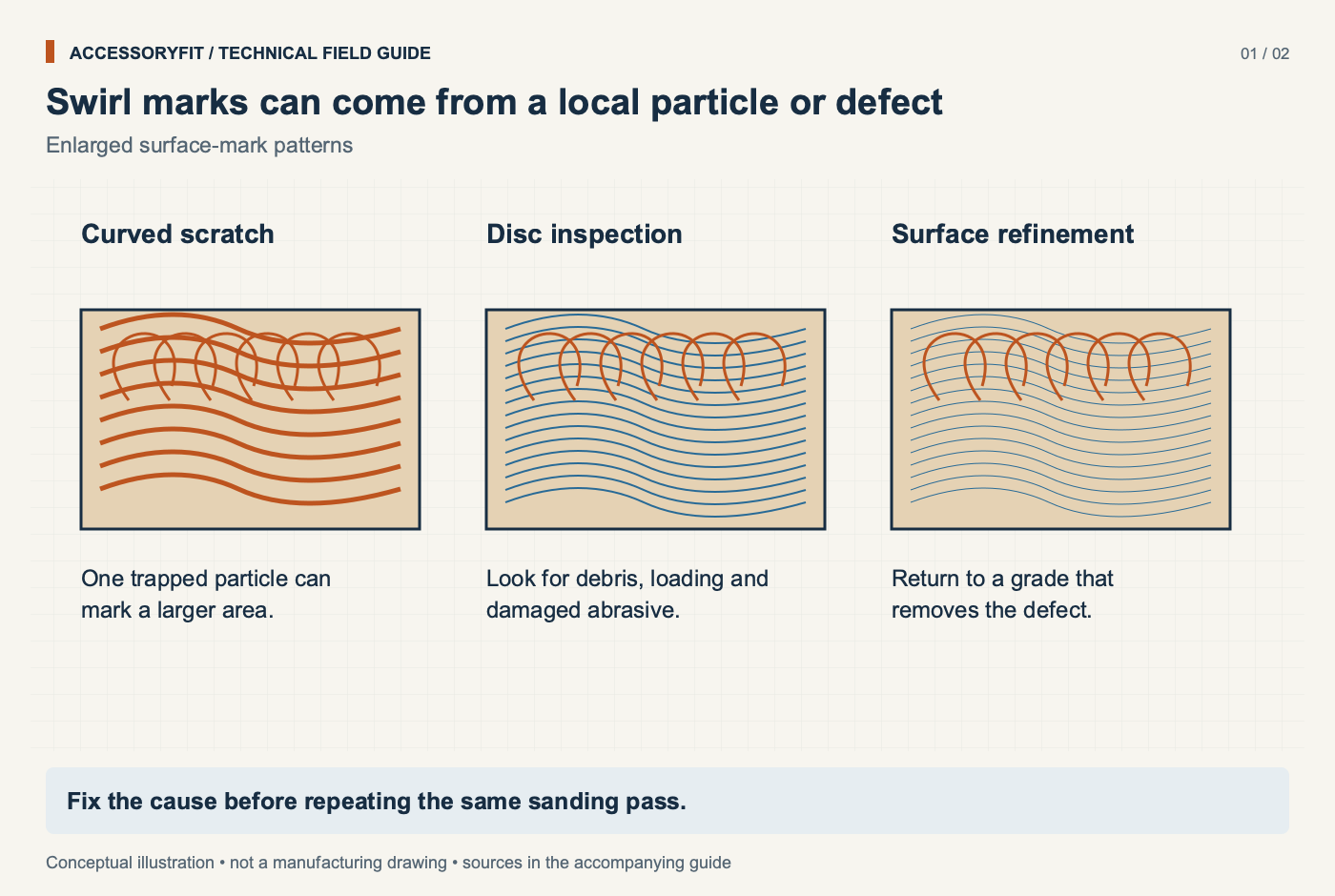
Swirl marks are small looped scratches, often called pigtails, that a random orbit sander leaves when its scratch pattern is deeper or less even than the grit you finished with should allow. They are hard to see on bare wood and obvious after a finish: stain collects in the deeper scratches and looks darker, and lacquer can highlight them as well. That is why a surface that looked smooth can turn blotchy under the first coat.
Each grit is meant to remove only the scratches left by the one before it. When that chain breaks, through a skipped grit, a stray coarse particle or a pad that is not running flat, the deeper scratches survive into the finish. The rest of this page works through the causes in the order worth checking, and the sanding and grinding accessories hub covers discs, pads and grits more broadly.
02What causes swirl marks from a random orbit sander?
The main causes are skipped grits, too much pressure, moving too fast, tilting the sander, a worn pad, debris under the disc and a large orbit used for finishing. The table below draws on Klingspor, Mirka, Woodcraft, Popular Woodworking, Family Handyman and Woodsmith, and pairs each cause with its sign and its fix. Technique causes come first because they are the most common and cost nothing to correct; pad and disc causes follow.
Random orbit sander swirl marks: causes, what happens and the fix
Cause
What happens
Fix
Sources
Skipping grits
Finer grit cannot remove the deep scratches, which show after stain or lacquer
Skip no more than one grit; work up through the sequence
Klingspor, Mirka, Wood Shop News, Woodcraft
Too much pressure
Pad rotation slows or stops, leaving long stretched swirls and dished areas
Light pressure, about 2-4 lb; let the sander's weight do the work
Popular Woodworking, Family Handyman, Woodsmith
Moving too fast
Uneven loops and stretched marks
About 1 in per second, or 5-10 s per 6 in
Family Handyman, Popular Woodworking
Tilting the sander
Gouges, scratches, rounded edges and shallow dips
Keep the pad flat; do not chase a scratch with the pad edge
Family Handyman, Woodsmith
Worn or damaged pad
Rounded pad edges make the sander hard to keep flat
Check the pad is flat edge to edge; replace when worn
Woodsmith
Debris under the disc or on the surface
A trapped chip creates a high spot; loose coarse grit scratches
Clean pad before fitting a disc; vacuum between grits
Woodsmith, Family Handyman
Low-quality discs
A few oversize particles cut too deep
Use quality discs with uniform grit
Family Handyman
Large-orbit sander for finishing
Larger loops are more visible
Use a small-orbit sander, or hand sand with the final grit
Popular Woodworking, Family Handyman
Starting or landing the sander carelessly
A running pad dropped onto the wood can dig in
Set the sander on the work before starting, or sweep it on before full speed (sources differ)
Family Handyman, Woodsmith
The speed-dial setting as a swirl cause was not found in a fetched source. Popular Woodworking only says lower speed helps you control the sander, for example on veneer.
03Are skipped grits causing the swirls?
Skipped grits are the first thing to check, because a finer grit cannot easily remove the deep scratches of a much coarser one. The sanding feels finished, but the coarse scratches remain under a layer of fine ones and appear once stain soaks into them.
How do you confirm it?
Look closely at the surface under good light before moving on. Scratches that are larger than the last grit should leave are left over from an earlier grit. If you went from a coarse removal grit straight to a fine finishing grit, this is the likely cause.
How do you fix it?
Go back one or two grits and work up again. The sources do not agree on how strict to be. Woodcraft gives the standard wood sequence as 60, 80, 100, 120, 150, 180, 220 grit and says to work through every grit. Klingspor and a Wood Shop News column allow skipping no more than one grit, and Klingspor's worked example of a large jump puts the abrasive used at about double the 220 paper normally needed, plus extra time. Every grit is the safest route; one skip is the most the sources allow. Start with the finest grit that removes the defects, not automatically with the coarsest, and see our sandpaper grit progression guide for sequences by project.
A related myth is that sanding bare wood finer always helps. Before stain, stop at about 180–220 grit: finer sanding closes the pores so the stain cannot soak in evenly.
04Does pressing harder cause swirl marks?
Yes. Extra pressure slows or stops the pad's random rotation, so the abrasive drags in long stretched loops and can dish the surface. Popular Woodworking, Family Handyman and Woodsmith all put the right pressure at about 2–4 lb, roughly the weight of your arm. Pushing harder to speed the job up does the reverse of what is intended. DeWalt's manual for the DeWalt DWE6423 agrees: pressing down slows stock removal and leaves a worse surface.
Heavy pressure also damages the pad. It crushes the hooks on a hook-and-loop face and builds heat, and a dull disc is better replaced than pushed harder. If the sander labours or the pad visibly stops spinning while it orbits, lift off some weight.
05How fast should you move a random orbit sander?
Slowly: about 1 in per second, according to Family Handyman and Popular Woodworking. Moving faster leaves uneven loops and stretched marks. On large surfaces, Family Handyman suggests overlapping each pass by about 50%.
Keep the pad flat while you move. Tilting the sander to chase a scratch with the pad edge gouges the wood, rounds edges and leaves shallow dips that show under finish. Starting the sander needs care too, and the two sources differ: Family Handyman says to set the sander on the work before switching it on, while Woodsmith says to switch on just above the surface and sweep it onto the work before it reaches full speed. Both agree that dropping a running pad onto the wood can dig in.
Motor speed is a separate setting. DeWalt and Makita both advise higher speeds on harder materials and lower speeds on softer woods, veneer and plastics. Neither maker links the speed dial directly to swirl marks, and no source behind this page does either, so treat the dial as a material setting: set it for the workpiece, then fix swirls through grits, pressure and travel speed.
06Does orbit size make swirls more visible?
Yes. Popular Woodworking says sanders with small orbits, under 1/8 in, are for finishing, while large-orbit sanders remove stock fast but leave larger, more visible swirls. If your sander has a large orbit, use it for the coarse grits and finish with a small-orbit sander, or hand sand along the grain with the final grit.
Makers publish orbit figures for several common sanders, and the first table below collects them. Festool sells one sander in two orbits: its manual gives the ETS EC 150/3 and ETS EC 150/5 strokes of 3.0 / 5.0 mm, the smaller for finishing and the larger for removal. Compare your own sander's figure with Popular Woodworking's threshold above to see which side of the line it sits on; if your model is not listed, the manual or rating plate gives it.
Pad size and hole pattern vary by brand and market too. The second table lists published pad specs for the random orbit sanders in our data, US and European: the US models listed use a 5 in pad, while Festool and Makita's larger model use 150 mm.
Orbit (stroke) diameter and speed range of random orbit sanders, as Festool, Bosch and Makita publish them
Sander
Pad
Orbit diameter
Speed range
Festool ETS EC 150/3
150 mm (6 in)
3.0 mm (1/8 in)
6,000-10,000 /min
Festool ETS EC 150/5
150 mm (6 in)
5.0 mm (3/16 in)
6,000-10,000 /min
Bosch ROS20VSC
5 in
3/32 in (2.5 mm)
7,500-12,000 OPM
Makita BO5041
5 in
1/8 in (3.2 mm)
4,000-12,000 OPM
Makita BO6050J
6 in
7/32 in (5.6 mm)
1,600-6,800 OPM
One maker source per model. Metric/imperial conversions for Makita are arithmetic. DeWalt does not publish an orbit size for the DWE6423.
Random orbit sanders in our data: pad size, holes and attachment (speeds in orbits per minute)
Tool
Pad
Pad holes
Pad attachment
No-load speed
Bosch ROS20VSC
5 in
not stated
hook-and-loop
12000 opm one source
DeWalt DWE6423
5 in
8 one source
hook-and-loop
12000 opm
Festool ETS EC 150/3 EQ-Plus
150 mm
not stated
StickFix one source
10000 opm
Makita BO5041
5 in
8 one source
hook-and-loop one source
not stated
Makita BO6050J
150 mm
not stated
hook-and-loop
not stated
Values marked one source appear in a single manufacturer document; check the tool's manual or rating plate before buying.
07Can a worn sanding pad cause swirl marks?
Yes. A pad with rounded or worn edges is hard to keep flat, and Woodsmith lists it among the causes of swirls; check that the pad is flat from edge to edge and replace it when it is worn. A pad whose hooks are crushed or clogged also lets the disc creep or lift, so the disc no longer runs as one with the pad.
How do you check the pad?
Unplug the sander, remove the disc and look at the hook face and the rim. Discs that will not stay on usually point to a worn or crushed hook face, dust or debris on the pad, poor alignment, or worn loop backing on the disc. Clean the hook face first; if clean discs still detach, the hook surface or the whole pad needs replacing.
Does pad hardness matter?
It changes how the disc meets the work. Festool sells its 150 mm pads in hard, soft and super soft versions: hard for edges and flat work, soft as a universal choice, and super soft for contours. An interface pad adds a soft layer between pad and disc that follows contours and takes wear instead of the pad. For flat panels, a hard or standard pad keeps the surface level; a very soft setup on a flat panel can round edges.
Fix the cause before repeating the same sanding pass.
08Can dust and debris under the disc leave marks?
Yes. A chip trapped under the disc creates a high spot that cuts deeper than the rest of the face, and loose coarse grit left on the surface gets dragged around under the next, finer disc. Vacuum or wipe the surface before each new grit, and clean the pad before fitting a disc.
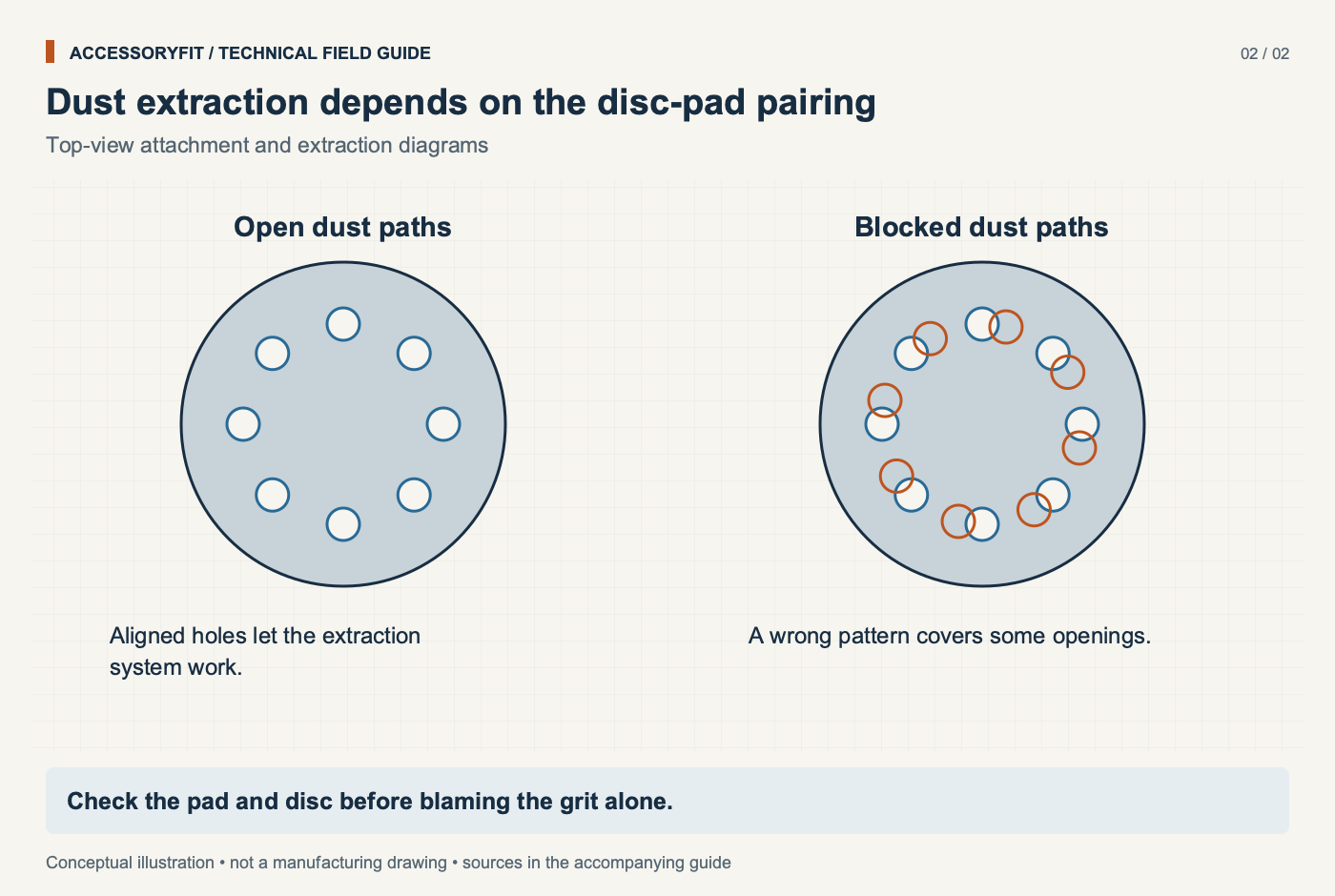
Extraction helps on both counts. Line up the disc's holes with the pad's dust ports when fitting it, because the holes only work when they match; Klingspor notes that discs with suction holes on a sander with extraction last considerably longer. Mesh discs such as Mirka Abranet draw dust through the whole face, so hole alignment does not apply to them. Hole patterns differ between 125 mm and 150 mm discs and between brands; the sanding disc sizes and hole patterns guide shows which patterns match which pads.
Disc quality is the last check. Family Handyman points to low-quality discs, where a few oversize particles cut deeper than the rest, as a cause of stray scratches.
Check the pad and disc before blaming the grit alone.
09Can mixing P-grade and CAMI discs cause scratches?
It can make the step between grits less even than the numbers suggest. European discs carry a P prefix on the FEPA scale, while US discs use plain CAMI numbers; the two match closely up to about 220 grit and drift apart above it. In the range used on bare wood, FEPA papers are slightly coarser and cut a little faster than CAMI papers of the same number, and Fine Woodworking notes that FEPA grading puts more particles close to the stated size, which tends to give a more uniform scratch pattern.
None of this makes mixed brands unusable, but if swirls appear after switching from one brand's sequence to another's, compare the actual grades. The P-grade grit equivalents chart lists both scales side by side.
10Is it safe to keep sanding with a disc that swirls?
Swirls themselves are a finish problem rather than a hazard, but two of their causes are worth stopping for. A disc that keeps lifting or creeping on a worn pad can come off in use, and sanding without extraction puts fine dust in the air. Popular Woodworking says a vacuum connected to the sander captures far more fine dust than an onboard bag or canister.
Dust control matters most at the end of a progression, which is exactly where swirl repairs happen. In a 2019 Technical University in Zvolen study using a random orbit sander with no dust box, fine discs put more dust in the air than coarse ones, about 48% more with P240 than with P40. Going back over a panel with the final grits to clear swirls adds the dustiest part of the job, so keep the extractor connected while you do it.
11How do you prevent swirl marks?
Prevention is a steady routine: a full grit sequence, light pressure, slow overlapping passes, clean surfaces between grits and a pad in good condition.
Work up through every grit where you can, and never skip more than one.
Use about the weight of your arm and no more.
Travel slowly and overlap passes on large panels.
Keep the pad flat; do not tilt it to chase a scratch.
Vacuum the surface and clean the pad between grits.
Fit discs with holes that match the pad, or use mesh discs.
Use a small-orbit sander, or hand sand with the final grit, before stain.
Use stearated abrasives on paint and lacquer to avoid clogging.
12When should you replace the disc or pad rather than adjust technique?
Replace the disc when it is dull or clogged, so you are not tempted to press harder, and replace the pad when it is no longer flat edge to edge or when clean discs still will not stay on. The fact base holds no wear limit in hours for either, so judge by how a clean pad and a fresh disc behave. When you replace discs, match the diameter and hole pattern to the pad, and stay within one brand's grading if you can.
The discs below are 5 in hook-and-loop discs, the most common size, with published specs from Mirka, Diablo and Bosch, plus a soft replacement pad from Bosch. For more options across grits and pack sizes, the hook-and-loop disc packs guide compares a wider range.
13Which replacement discs and pads suit swirl-free sanding?
Product links go to Amazon. As an Amazon Associate I earn from qualifying purchases. How links are chosen.
These are 5 in discs and a pad for random orbit sanders, grouped by what they address rather than ranked. Specs come from each manufacturer's product page. Check the disc's hole pattern against your pad before buying; mesh discs fit any pattern.
For dust-free finishing on any hole pattern
Mirka Abranet 5 in Grip P120 net discs, 50 pack
Diameter
5 in
Grit
P120
Holes
net (open mesh, fits any hole pattern)
Attachment
Grip (hook-and-loop)
Abrasive
aluminum oxide on polyamide net
Discs
50
Suits Hook-and-loop sanders of this size, sanding wood, primers, lacquers, putty and composites with extraction.
Skip it if PSA pads, and users who want a CAMI-graded sequence throughout.
Net construction extracts dust through the whole face
Fits any hole pattern
FEPA P120 grade
Mirka lists wood, MDF, veneer, metals and solid surface
Mirka advises a pad saver between net discs and the pad for continuous sanding
P-grade numbering differs from CAMI above the fine grits
Suits Orbital and DA sanders whose pads match the 12-hole universal (fits 5- and 8-hole sanders) layout, for moderate removal and paint preparation in wood, metal and plastic.
Skip it if Final passes before stain, which need finer grits.
Universal hole layout covering the two common smaller-pad patterns
14What related sanding problems appear alongside swirls?
Swirls often come with discs flying off, dished panels and blotchy stain, because pressure, pad wear and grit choice drive all of them. Blotchy stain on closed-grain woods can also come from sanding too fine, the opposite mistake to skipping grits. Detail sanders bring their own pad shapes; the mouse and delta sander pads guide covers those. For other accessory faults, the troubleshooting guides index lists each problem by tool, and you can look up what fits your tool by sander model.
15Questions readers ask
Why do swirl marks only show after I apply stain?
Stain collects in deeper scratches and darkens them, so marks hidden on bare wood become visible. They are usually left over from a skipped grit or from heavy pressure.
How much pressure should I put on a random orbit sander?
About 2–4 lb, roughly the weight of your arm. More pressure slows the pad's rotation and leaves stretched swirls.
Do mesh discs damage hook-and-loop pads?
Not in themselves. Mirka Abranet uses a standard loop backing; pad damage is more likely from pressing too hard or debris on the hooks. Mirka does advise a pad saver for continuous sanding with net discs.
Can I go straight from a coarse grit to a fine one if I sand longer?
It takes much longer and the deep scratches tend to survive. Woodcraft says to use every grit; Klingspor says skip no more than one.
Will hand sanding remove swirl marks?
Hand sanding along the grain with the final grit is one of the fixes listed for large-orbit sanders. Deep swirls from a skipped grit need the missing grit first.
Axminster Tools: Festool Multi-Jetstream2 Pad for ETS150 Sander; Mirka Interface Pad 125mm 953284
Benchmark Abrasives: Sanding Discs Buying Guide: PSA vs Hook & Loop vs Fiber
Bosch: EXPERT C470 Sandpaper with 8 holes for Random Orbital Sanders; ROS20VSC 5 in Random Orbit Sander product page; ROS10/ROS20VS operating/safety instructions 2610051955; 1617/1618 router operating/safety instructions (2610051825); Hook & Loop Sanding Discs for Wood product family page; Backing Pads product family page
Colorado State University and Montana Technological University, Annals of Work Exposures and Health 67(5): The Evaluation of Worker Exposure to Airborne Silica Dust During Five OSHA Table I Construction Tasks
DeWalt: DWE6423 5 in variable speed random orbit sander with hook and loop pad; DWE402/DWE402N/DWE402G/DWE4222N Instruction Manual NA190466; DWE6420/DWE6421/DWE6423 Random Orbit Palm Sanders instruction manual N412818; DWE6423 5 in Variable-Speed Random Orbit Sander product page; DWE575 circular saw instruction manual (N786997)
European Parliament, Legislative Observatory (procedure 2016/0130(COD), final act summary): Protection of workers from exposure to carcinogens or mutagens at work: exposure limit values - Directive (EU) 2017/2398, final act
Family Handyman: 10 Tips for Mastering the Random Orbit Sander
Festool: ETS EC 150/3 EQ and ETS EC 150/5 EQ original instructions (PDF); Random Orbital Sander ETS EC150/3 EQ-Plus (576326) product page
Fine Woodworking (Taunton Press): True Grit, by Mark Schofield (Fine Woodworking #176); Full Grit Chart (English), PDF
Freud and Diablo: Get the most out of your Freud bits by routing at ideal feed rates and speeds; DCD050100H50G ROS Hook & Lock Discs product page
General Finishes: What Grit Should I Use for Prep Sanding Raw Wood?; Exterior 450 Instructions, PDF; What is the best sandpaper or abrasive to use for finish sanding?
Health and Safety Executive (UK): Wood dust exposures in manufacturing industries; EH40/2005 Workplace exposure limits (Fourth Edition 2020)
Hemlock Hardware (Diablo listing): Diablo 6 In. 60-Grit 6-Hole Pattern Vented Sanding Disc with Hook and Lock Backing
HookandLoop.com: Replacing sanding discs with hook and loop
IMC Clains (specialist retailer): Stone, Belt, Paper, Film and Compound Grit Comparison, PDF
Klingspor: Coated Abrasives Basics; Finishing column, April 2022: skipping grits in the sanding sequence; Hole pattern for abrasives (Lowdown on grinding); Self-fastening disc (Lowdown on grinding); Grit Grading Systems (Coated Abrasives Basics)
Makita: BO6050 Random Orbit Sander instruction manual; BO6050J 6 in Random Orbit Sander product page; BO5041 5 in Random Orbit Sander product page; BO5040/BO5041 instruction manual; BO6050 Random Orbit Sander product page; 9557PB angle grinder instruction manual; 5007F 7-1/4 in circular saw instruction manual
Mirka: Get the most out of your abrasives with Mirka's problem-solving abrasives; ABRANET 5 in Grip product page (US); Technical Data Sheet - Abranet abrasives
National Toxicology Program, US Department of Health and Human Services: Report on Carcinogens, Fifteenth Edition: Wood Dust
NIOSH: Comprehensive Report: Laboratory Evaluation of Saw Blades for Cutting Fiber-Cement Siding; Hazard Controls: Control of Wood Dust from Random Orbital Hand Sanders and Orbital Hand Sanders
OSHA: Occupational Exposure to Respirable Crystalline Silica; Final Rule (29 CFR Parts 1910, 1915, and 1926); 29 CFR 1910.215 Abrasive wheel machinery; 29 CFR 1910.243 Guarding of portable powered tools; 29 CFR 1926.303 Abrasive wheels and tools; 29 CFR 1926.300 General requirements (Tools, hand and power); 29 CFR 1926.304 Woodworking tools
PACE Technologies: Grit Size Converter
Popular Woodworking: Random-Orbit Sanders
Purdue University, Journal of Occupational and Environmental Hygiene: Evaluation of Cut-Off Saw Exposure Control Methods for Respirable Dust and Crystalline Silica in Roadway Construction
Technical University in Zvolen, MM Science Journal: Effect of Selected Factors on Mass Concentration of Airborne Dust During Wood Sanding
Tool Nut: Diablo DCD060100H10G 6 in Sandpaper Hook & Loop; Festool 202458 Multi JetStream2 150mm Soft Pad for ETS/ETSC 150; Festool 203348 6 in StickFix Multi Jetstream2 Interface Pad 150mm; Mirka Abranet 5 in 150 Grit Mesh Sanding Disc 9A-232-150; Mirka Abranet 6 in P150 Hook and Loop Sanding Discs 9A-241-150RP
United Abrasives / SAIT: 2025-2026 Product Catalog (English)
University of California, Berkeley, Journal of Occupational and Environmental Hygiene 16(5): Effect of hollow bit local exhaust ventilation on respirable quartz dust concentrations during concrete drilling
University of Illinois Library, Engineering standards list: ANSI B74.12 entry
University of Massachusetts Lowell, Journal of Occupational and Environmental Hygiene: Reducing Silica and Dust Exposures in Construction During Use of Powered Concrete-Cutting Hand Tools: Efficacy of Local Exhaust Ventilation on Hammer Drills
US Government Publishing Office, Electronic Code of Federal Regulations: 29 CFR 1926.1153 Respirable crystalline silica (current eCFR text)
Virginia Tech, Annals of Work Exposures and Health 69(3): Silica exposure controls usage in masonry and concrete trades: before and after enactment of the OSHA Silica Construction Rule (1926.1153)
Weiler Abrasives: Flap Disc Brochure WC117 (2026)
Wikipedia: Sandpaper
Woodcraft: Sanding Basics
Woodsmith: Secrets for Smooth Surfaces
Woodworker's Journal: What Ruined My Sander's Hook-and-loop Pad?; Pointers on Sanding Discs?